Think visually. Decide with AI
Think across
Map it out
Ask a question. Explore the paths. Bring it together.
ThinkXMap is a visual AI workspace for exploring complex questions and preparing decisions. It transforms source text or Markdown into a map of connected cards, allowing users to develop parallel directions, analyze fragments, run multi-step AI Tools, and combine selected findings.
The product combines an AI chat, a visual board, and an analytical workflow:
- AI chats provide fast answers but poorly represent complex structure;
- traditional canvases show structure but do not perform analysis;
- ThinkXMap connects visual structure with AI actions and preserves the path from source material to conclusions.
Its core principle is to manage the research process, trace conclusions, and present results clearly.
The Problem the Product Solves
Complex work rarely fits into one prompt. Strategic decisions, product reviews, due diligence, and research require parallel analysis, repeated use of source data, and deliberate selection of final findings.
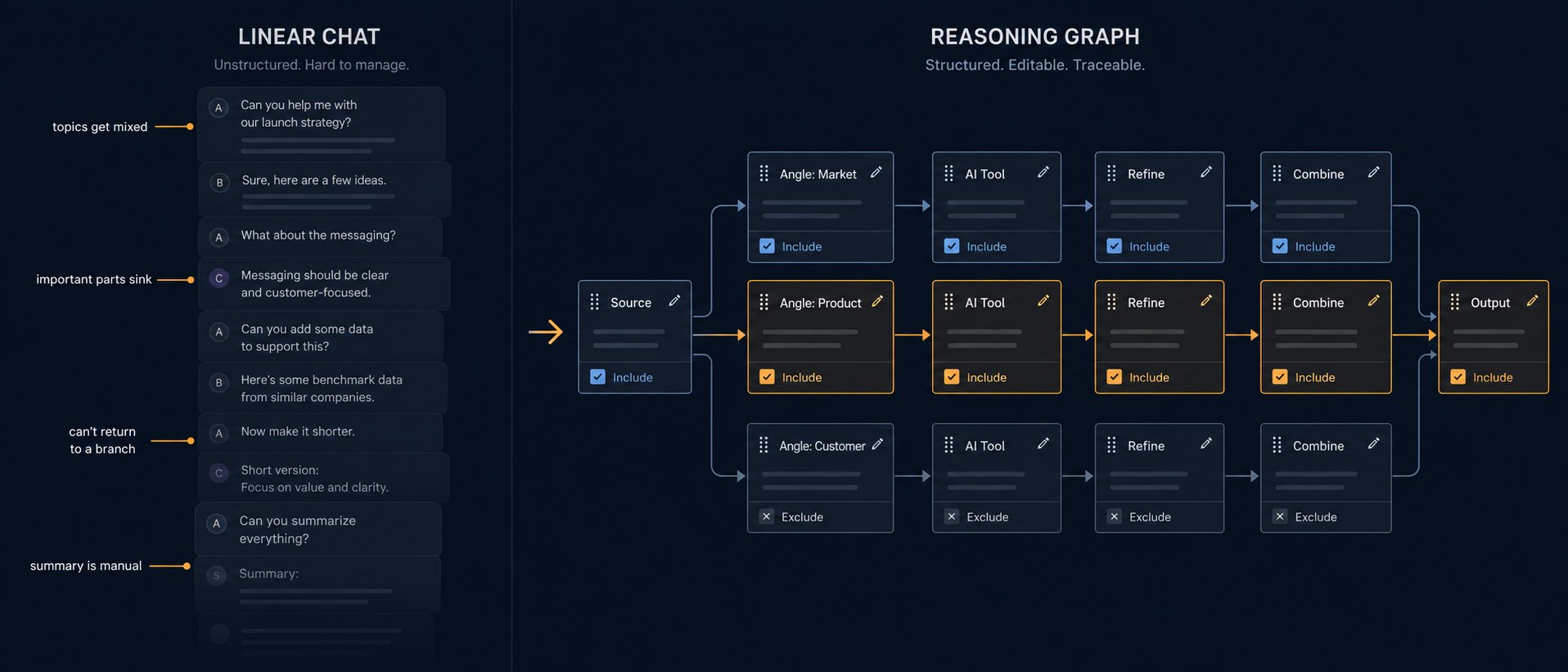
The problem with linear chat
AI chat mixes everything
into one thread
ThinkXMap separates reasoning into editable branches. Every node is a controllable part of the thinking process: edit it, branch it, include it in the result, or leave it out.
Everything in one feed
- Topics merge into one context
- Important details get lost in the conversation
- You cannot return to a fork in the reasoning
- You assemble the final result manually
A controllable line of thought
- Reasoning nodes are connected by directed links
- Each node is editable context: revise its title and content inline
- Include or exclude a node from the context for the next step
- Branching creates an independent path without mixing context
“I do not scroll through answers — I assemble and edit the reasoning itself, choosing what goes into the conclusion.”
Three product pillars
Three core capabilities of ThinkXMap
AI Tools
Ready-made multistep analyses turn source material into a map without complex prompts. Parallel branches and an analytical structure replace manual prompt engineering.
Combine
Controlled synthesis brings the right cards into one conclusion. Context controls and aggregation, transformation, and synthesis modes adapt to the task, not a template.
Visual branches
Parallel paths replace the chat feed: nothing gets lost, and you can return to any fork. A visible path leads to every conclusion.
How it works
Build, refine, and connect your thinking
From raw material to a traceable decision, every step stays visual, editable, and under your control.
Create a map
Action — Upload a Markdown or rich-text document, or paste text, a note, an idea, or a question.
Result — The source material becomes the first card on the canvas, with the option to start an AI analysis right away.
Edit content
Action — Open any card—source, branch, AI Tool result, or Combine output—and edit its title and text.
Result — Your map remains living material, not an archive of answers. Every edit becomes part of the context for future questions and synthesis.
Select a fragment
Action — Highlight a specific passage inside a card and ask a question about that exact selection.
Result — Ask, Explain, Go deeper, and Example modes let you work precisely without losing the context of the full map.
Branch
Action — Develop a selected fragment into child branches and follow-up questions.
Result — Parallel paths evolve independently. Return to any fork at any time without mixing everything into a single thread.
Refine AI output manually
Action — Clarify, shorten, or expand a card created by AI Tool or Combine before developing it further.
Result — You remain the author of the conclusion: AI provides a foundation, you sharpen the wording, then continue from the revised version.
Manage layout and style
Action — Move cards around the canvas, change their order, and adjust their visual styling.
Result — The map reflects your logic rather than the order in which answers appeared, while related paths stay conveniently close.
AI Tool
Action — Run a ready-made multistep workflow such as PESTEL, SWOT, PRD Review, Startup Validation, and more.
Result — The tool turns the task into a tree of analytical cards with parallel paths, multiple levels of depth, and visible progress. Every card remains editable.
Combine
Action — Select completed cards in a deliberate order and choose an action: Ask, Rich Text, Markdown, or “into one card.”
Result — Create a controlled synthesis using only the selected material, with full context control and traceability. Use it for aggregation, transformation, or synthesis.
Export
Action — Copy a branch as Markdown or export the entire map as a standalone snapshot.
Result — Get a decision memo, plan, brief, or document ready to paste into the tools where your work continues.
Built for your work
Clarity and speed — for your work
ThinkXMap turns a conversation with AI into a map that shows how a conclusion came together — shortening the path from source material to result.
Clarity
- A map instead of a feed: paths stay separate, and you can return to any fork.
- See the basis for each conclusion: which cards were included in Combine and in what order.
- Ready-made methods (AI Tools) replace manual prompt engineering, so you do not have to hold the analytical structure in your head.
Speed
- Parallel branches are explored simultaneously, not one at a time in chat.
- An AI Tool maps the task for you — start an analysis in one click.
- Combine gathers selected cards into a memo, plan, or list without manually rebuilding them from separate answers.
Upload a memo → run Strategic Due Diligence → refine risks → assemble a decision memo in Combine.
“In chat, an answer disappears into the conversation. Here, it remains a map node you can develop.”
Market signals
The market is already redesigning work around AI
The value of AI today comes not from access to a model, but from redesigning the processes of thinking and decision-making. That is where ThinkXMap works: it turns fragmented AI requests into a controllable process — from source material through branching and ready-made AI Tools to synthesis in Combine and a final decision.
AI impact comes from redesigning processes, not model access
Companies see returns when they redesign workflows and scale best practices, rather than simply add another chat. ThinkXMap provides the environment: repeatable multistep analysis instead of manual prompt engineering, with a structure that makes the basis for every conclusion visible.
Knowledge workers are overloaded with communication and meetings
Time disappears into messages, meetings, and rebuilding context. ThinkXMap preserves decision context and turns meeting material into structured conclusions, actions, and executive briefs — instead of an endless message feed.
Research and data analysis are leading enterprise AI use cases
Organizations use AI primarily for data analysis, research, and insight generation. These are exactly the tasks ThinkXMap is built for: explore multiple paths in parallel, compare sources, and assemble an evidence-based result.
The industry itself is moving beyond chat alone
The strongest market signal is that leaders have recognized the limits of linear chat and added structured, spatial layers on top of AI. If linear dialogue were enough, the largest players would not be building canvases and artifacts around it.
A dedicated work canvas beside chat, because linear dialogue does not hold up for long, structured work.
Moves the result out of the feed and into a separate editable workspace.
AI is built directly into the canvas for clustering, generation, and sticky-note analysis — evidence of demand for the board-plus-AI combination.
Cognitive foundation: research on the limits of conversational interfaces (Nielsen Norman Group) and the theory of external cognition and spatial reasoning (Kirsh, Scaife & Rogers) explain why visual, spatial placement reduces cognitive load and improves retention of complex structures — a direct case for a map instead of a feed.
The market is moving from one-off AI answers to controllable knowledge work. ThinkXMap makes that transition practical.
Plans
Simple plans — choose your level of freedom
ThinkXMap does not hide features behind complicated metrics. Three tiers give you three answers to the question “whose engine and whose billing?”: try the built-in Open Engine without signing in, work free with your own key and no request limits, or use Pro models out of the box without worrying about infrastructure. You can switch to your own provider at any time and keep working without limits.
| Feature | Guest (no sign-in) | Free (signed in) | Pro ($20/mo) |
|---|---|---|---|
| Maps | 1 | 10 | 200 |
| Daily requests | 15 | 15 on Core / Open Engine Unlimited with your own engine (BYOE) | 500 on Pro models Unlimited with your own engine (BYOK) |
| Default engine | Open Engine (built in) | Open Engine (built in) | Pro models (Claude / GPT) |
| Your own engine (BYOK) | — | ✓ Your API key ✓ Your local provider (OpenRouter, LM Studio, Ollama, CLI connectors) | ✓ Everything in Free + Pro models |
| Web search and up-to-date results | — | ✓ Your API key ✓ Your local provider | ✓ Pro models (Claude / GPT) |
| Combine (AI synthesis) | ✓ Included in the 15-request limit | ✓ On Open Engine — within the 15/day limit ✓ With your own engine — unlimited | ✓ On Pro models — within the 1,000/month limit ✓ With your own engine — unlimited |
| AI Tools | Basic (demo) | Basic + access to free tools in the catalog | Full catalog, including deep and specialized tools |
| Export / copy | ✓ | ✓ | ✓ Advanced (Markdown, Rich Text, snapshots) |
| Map storage | Session only | ✓ Persistent storage (up to 10 maps) | ✓ Persistent storage |
| Access maps on any device | — | ✓ | ✓ |
Open Engine is the built-in starter engine. You get 15 requests per day to try the product. It handles basic tasks well, but it is not a replacement for top-tier models.
Your own engine (BYOK) lets you connect your own unrestricted key (OpenRouter, ChatGPT API, Claude API) or a local provider (LM Studio, Ollama). Request limits are removed; usage costs stay on your side.
Pro models give you Claude and GPT out of the box, with no keys required. 500 requests cover regular analytical work. When you reach the limit, switch to your own engine and continue without restrictions.
Start with your own material
Simply begin
With an account, your maps and cards are saved so you can return later and work with more context.